CiTi · Computer Coding · Year One · Unit 3 · Project 1
My First Website
Project Requirements & Planning Worksheet
Student Info
Project Overview
You will build a website on a self-selected topic, minimum five pages, and publish every page live so anyone on the internet can view it. There is no upper limit. Many sites grow to 20+ pages. This is the first real project in Year 1. You are not building a practice exercise, you are building a real website.
Every page must link to your external CSS file. Every page must be published via SFTP. Grading is done from your live URL only, if a page doesn't load at its URL on submission day, it earns zero points for that section regardless of what's on your computer.
My Topic
Your website needs to be about something you can actually write content for. Think specific: not “sports” but “mountain biking in the Adirondacks.” Not “music” but “the history of hip-hop production.”
My chosen topic
My target audience (who is this site for?)
One-sentence elevator pitch for my site
Required Pages
All 5 required1Homepage: index.html
- Top navigation bar linking to all pages on your site
- Bottom footer on every page in the site. Build it once in your CSS and apply it everywhere.
- Meaningful content related to your site’s topic
- External CSS linked using
<link rel="stylesheet" href="...">
2Contact Page
- HTML form with these fields: Name, Address, Email, Comments
- When submitted, form delivers an email with the date, time, and IP address of the sender
- Server-side form processing: your teacher will provide the form
actionURL
3About Us Page
- Body copy section written specifically about your website’s subject
- Real, well-written content. No placeholder text.
4Photos & Videos Page
- At least one embedded video (YouTube or Vimeo) related to your topic
- At least two photos/images related to your topic
- Include the source of each image (where it came from)
5About Author Page
- General information about you, the site author
- Do NOT include: personal email address, home address, or phone number
Site-Wide Rules
File & Folder Naming
- All lowercase. No capitals anywhere.
- Underscores only. No spaces, no hyphens in folder or file names.
- Each content section gets its own folder with
index.htmlinside - Your CSS file lives in a
css/folder at the root
External CSS: Required
- One
.cssfile linked in the<head>of every page - Styles applied consistently. Your site should look like one site.
- No
<style>blocks or inlinestyle=""attributes (best practice)
Folder Structure Plan
Plan before you buildPlanning your folder structure is the first real problem-solving task of this project. Before you write a single line of HTML, you need to think through what pages your site needs, how they relate to each other, and how a visitor will navigate between them. Getting this wrong early leads to broken links, confusing file paths, and mistakes that are much harder to fix once pages are built.
Use the problem-solving cycle below as your planning process. Define the pages your site needs and what content each one holds. Plan the folder layout on paper before touching your computer. Execute by building the structure, then Reflect: does the navigation make sense, does every page belong where it is? Get your teacher’s approval before you start coding.
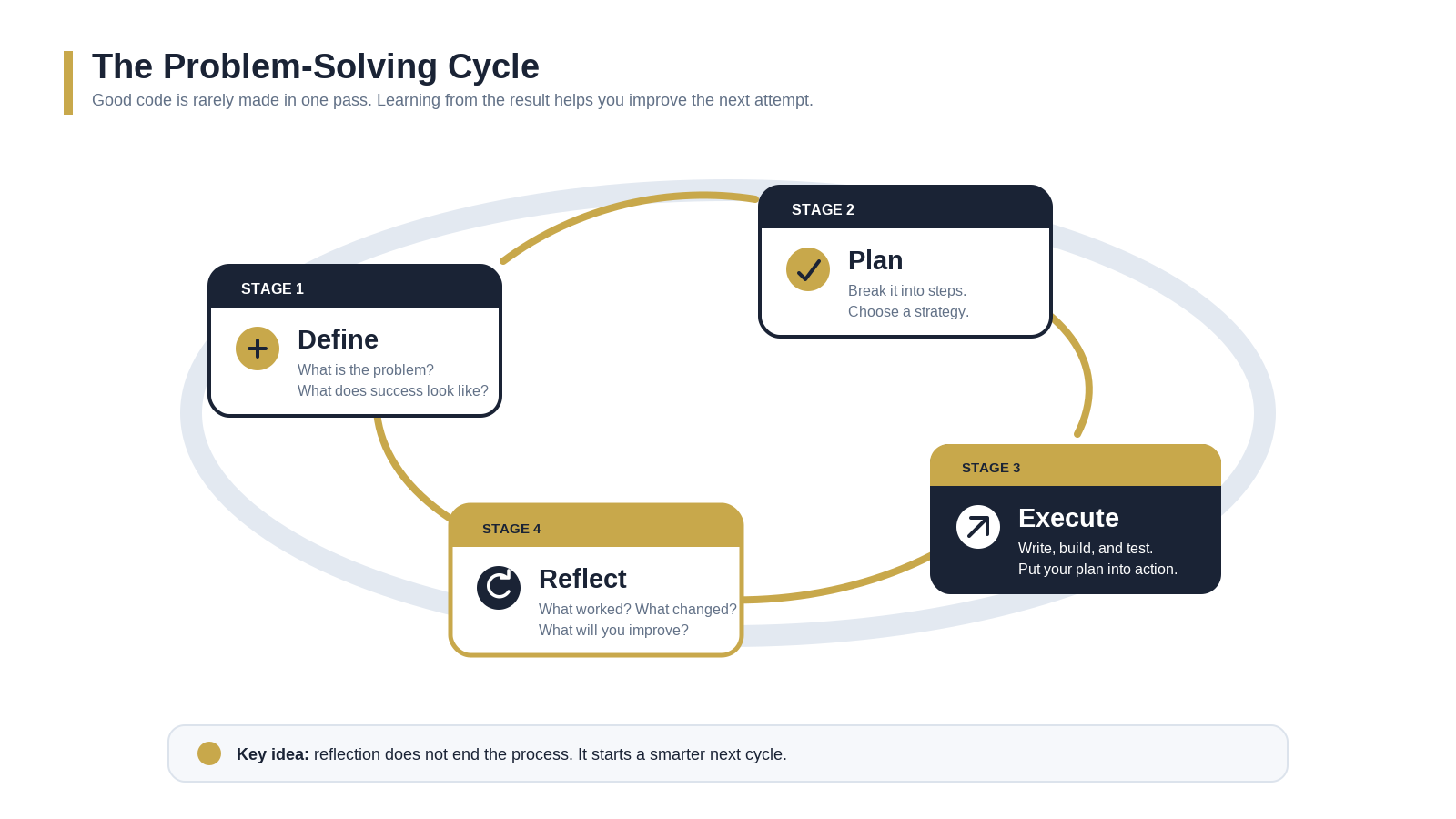
Click to enlarge.
Sketch your folder structure below before you create anything. Use underscores, no spaces, all lowercase. Your teacher checks this before you start coding.
↑ Each major section gets its own folder with an index.html inside. This is how professional sites are structured. You can rename folders to match your topic as long as naming rules are followed.
Page Planning
One card per pageProject Rubric
300 points total| Category | What’s evaluated | Pts | Self | Teacher |
|---|---|---|---|---|
| HTML Quality | Valid, semantic markup across all pages; proper use of structural tags | 30 | ||
| CSS Integration | External stylesheet linked on every page; consistent, intentional styling site-wide | 40 | ||
| Site Structure & Navigation | Correct subfolder structure; working navigation linking all pages on the site | 30 | ||
| Content Quality | Real, written content across the site; topic-appropriate, proofread, no placeholder text | 30 | ||
| Required Pages Present | All 5 minimum pages published and loading at live URLs on submission day | 20 | ||
| Contact Form | All required fields (Name, Address, Email, Comments); delivers email with date, time & IP | 40 | ||
| Media | At least one embedded video and two images on the Photos page (sources documented); each page has at least one content image, typically in a left/right column layout | 25 | ||
| Publishing & File Management | Naming conventions followed; no broken links; all pages live and accessible | 25 | ||
| Reusable Components | Nav, footer, and CSS classes built for reuse; code is modular, not copy-pasted per page. Techniques for building reusable components will be covered in follow-up lessons. | 30 | ||
| Above & Beyond | Design polish, extra pages, creative features beyond minimum requirements | 30 | ||
| Total | 300 | |||
Success Criteria
Check before you submit- I chose a topic and had my folder plan approved before coding
- My homepage has a working navigation bar linking to all my pages
- Every page has a footer
- Every page links to the same external CSS file
- My site has consistent styling across all pages
- All file and folder names are lowercase with underscores only
- My Contact page has all 4 required form fields
- My Photos & Videos page has at least 1 video + 2 images
- My About Author page has no private contact info
- Every page is published via SFTP and loads at its live URL
- I tested every navigation link on the live site
- I completed the rubric self-evaluation above
Resources
w3schools.comadventureskies.com/citi/coding/html.pdf<iframe> codeunsplash.com or pexels.com (document your source on the Photos page; good professional practice)<form method="post" action="YOUR_FORM_ACTION_URL"> (your teacher will give you the action URL)Submission
My final submitted URL (write it here on submission day)
All grading is done from the live URL above. Make sure every page loads before you write this down.